[addtoany]
Finding the right tool
Excel has many different tools. There are, for example, tools for colouring cells, tools for creating charts and tools for changing colours in charts. All these tools can be reached through different menus. The most important place to access tools is the ribbon. Through the ribbon you as a user can reach all the common tools in Excel, and it is also a good place to discover new tools.
The ribbon
Through the ribbon you can access almost all the tools available in Excel. The Home tab contains the most common tools, but there are many handy tools in the other tabs too. Don’t be afraid to save and experiment!

The ribbon is divided into groups. Click the black arrow  in the bottom right corner of a group to see more options relating to that group. Hold the mouse pointer over a tool to get a short explanation of it.
When you select an inserted object (shape, picture, chart, table, pivot table) new tabs appear with special tools for that particular object.

Quick Access Toolbar
The Quick Access Toolbar contains buttons for commands that are visible regardless of which tab is selected. You can add tools from the ribbon by right-clicking the selected tool and choosing ”Add to Quick Access Toolbar”.

Context menus
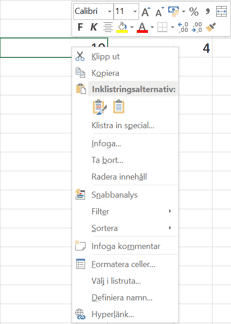
Context menus appear when you right-click a selection (sheet, row, column, cell, chart, table, shape, etc.) or when you make selections and Excel wants to help. The context menus give quick access to the tools Excel thinks are most relevant for your selection. All these tools can also be reached through the ribbon.

Some of our customers
Our customers include both large and small companies.