Cell references
In formulas you can refer to other cells. Thanks to this, you can break down your calculations in Excel and so make Excel models easier to work with.
How to refer to other cells
To refer to cells, you first start with an equals sign (=) in the formula bar to show that you intend to write a formula and not a value. Then you refer to cells using the keyboard or the mouse. If you use the keyboard, you can type the cell’s name or use the arrow keys in combination with Shift to select the cell you want to refer to. If you use the mouse, you can click the cell you want to refer to (together with click and drag, Shift and Ctrl). You can do this even if the cell is in another worksheet or in another workbook.
Using references to break down problems
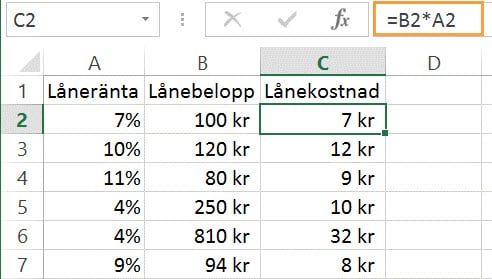
Every calculation consists of inputs and logic. Instead of writing =100*0.07 in a cell, the problem can and should be broken down into inputs, logical steps and results. Using references to break down calculations makes it easier to understand the calculation, change inputs and reuse logic.
The whole calculation in one cell

Broken-down calculation
Previous
Some of our customers
We have both large and small companies as customers.