
[addtoany]
Writing functions
There are two ways to write functions. The ways are similar. One way is simply to type the function with the keyboard. The other way is to use the Insert Function tool, which helps beginners along.
Writing functions with the keyboard
You write functions with the keyboard as follows:
- Type an equals sign ”
=” in the formula bar and then the function name followed by an opening parenthesis"(".
- Start typing. As you type, you will see all functions that begin with those letters.
- You can use Tab to autocomplete the function name selected in the drop-down list.
- Finish typing the function.
- All functions have the form
NAME(value,value,...)
- Functions ask for 0 or more arguments:
...means that the preceding argument can be entered any number of times[invärde]means that the argument does not have to be specified
- All functions have the form
- Press Enter.
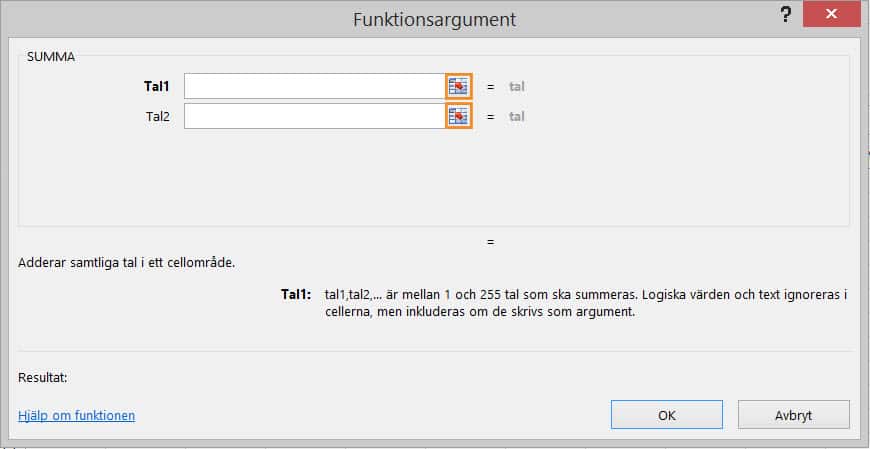
Writing functions with Insert Function
Writing functions with Insert Function is easier for beginners but tends to take longer. Do as follows:
- Click Insert Function
 .
. - Choose a function. (Search for a function, choose a function in one of the categories, or choose a function from the most recently used.)

- Enter the requested values. (Click the small selector button next to the text fields to select cells with the mouse.)
Previous
Some of our customers
We have both large and small companies as customers.












Contact us
Excel experts
We are among the country’s leading Excel experts. We help you use Excel in the best possible way and achieve better results faster.

